
A Next.js contact form without a backend means MuxForms handles ingest instead of a Route Handler, Resend, and spam code in your repo. Embed on an App Router page or POST JSON from a Server Action with the ingest secret after allowing your production origin.
Article
Add a Next.js contact form without writing a backend
Skip the API route, CORS debugging, and inbox glue. Embed MuxForms or POST to the submit endpoint and read replies in one dashboard.
Next.js integration
| Approach | MuxForms piece |
|---|---|
| Fastest | embed.js on a page |
| Custom UI | Server Action + ingest secret |
| Client fetch | Allowlist origin or server proxy |
| Docs | /docs/nextjs and /docs/api |
Every Next.js marketing site eventually needs a contact form. The default path is a Route Handler, an email provider, rate limiting, spam heuristics, and a spreadsheet someone forgets to check. You have shipped that stack before. It is not unique to this product.
MuxForms is a hosted form backend: you define fields in a dashboard, allow your production origin, and either drop in embed.js or POST JSON from a Server Action. Submissions land in one inbox and can trigger email notifications. This tutorial walks through all three patterns on the App Router, shows what success looks like in the dashboard, and covers the errors you will actually see in production (CORS, 403, 422).
If you are evaluating vendors, see MuxForms vs Formspree for pricing and limits side by side.
What you will build
By the end you will have a working contact form on a Next.js page, submissions visible in MuxForms, and a clear rule for when to use the embed versus a Server Action versus fetch from the browser.
You need:
- A Next.js 14+ App Router project (Pages Router works for the embed only; Server Actions need App Router).
- A MuxForms account and one form with fields such as
name,email, andmessage. - Your production URL (for example
https://www.example.com) ready to paste into the form allowlist.
Step 1 — Create the form and allow your origin
In the MuxForms dashboard, create a form and note the form id (UUID). Under allowed origins, add:
http://localhost:3000while developinghttps://www.your-domain.comfor production (include the scheme; no trailing path)
Browser-based submits (embed or client fetch) are rejected with 403 if the Origin header is not on that list. Server Actions that use the ingest secret do not depend on CORS, which is why many teams prefer that pattern for custom React UI.
Copy the embed snippet from the Install tab. It looks like this:
<div data-form-id="FORM_UUID"></div>
<script src="https://www.muxforms.com/embed.js"></script>
Replace FORM_UUID with your real id. Full reference: Website embed.
Step 2 — Fastest path: embed on a marketing page
For a static or mostly static page, the embed is the smallest diff. Create app/contact/page.tsx:
export default function ContactPage() {
  return (
    <main className="mx-auto max-w-xl px-6 py-16">
      <h1 className="text-3xl font-semibold">Contact</h1>
      <p className="mt-4 text-muted">We reply within one business day.</p>
      <div className="mt-8">
        <div data-form-id="FORM_UUID" />
        <script src="https://www.muxforms.com/embed.js" async />
      </div>
    </main>
  );
}
Next.js will not execute a raw <script> tag inside a Server Component the way a static HTML file would. Two common fixes:
- Load the script with
next/scriptin a Client Component wrapper, or - Put the div in the page and add
embed.jsonce inapp/layout.tsxvia<Script src="https://www.muxforms.com/embed.js" strategy="lazyOnload" />.
Example Client Component:
"use client";

import Script from "next/script";

export function MuxFormsEmbed({ formId }: { formId: string }) {
  return (
    <>
      <div data-form-id={formId} />
      <Script src="https://www.muxforms.com/embed.js" strategy="afterInteractive" />
    </>
  );
}
The embed downloads your schema from GET /api/v1/forms/{id}, renders fields, validates them, and POSTs to the submit endpoint with the correct submit token. You do not maintain field lists in two places.
Styling is controlled in the dashboard (colors, radius, fonts). Deeper Next.js notes live in Next.js docs.
Step 3 — Custom UI with a Server Action (no CORS)
When the form must match your design system exactly, keep your JSX and send data server-side. Generate an ingest secret on the form’s security settings (Dashboard → form → Design → ingest security). Store it in .env.local:
MUXFORMS_FORM_ID=00000000-0000-0000-0000-000000000000
MUXFORMS_INGEST_SECRET=ingsec_xxxxxxxx
Never commit the secret or expose it in a Client Component. The Server Action runs only on the server.
"use server";

const SUBMIT_URL = `https://www.muxforms.com/api/v1/forms/${process.env.MUXFORMS_FORM_ID}/submit`;

export async function submitContact(formData: FormData) {
  const payload = {
    name: String(formData.get("name") ?? ""),
    email: String(formData.get("email") ?? ""),
    message: String(formData.get("message") ?? ""),
    _hp: "",
  };

  const res = await fetch(SUBMIT_URL, {
    method: "POST",
    headers: {
      "Content-Type": "application/json",
      Authorization: `Bearer ${process.env.MUXFORMS_INGEST_SECRET}`,
      "X-MuxForms-Ingest-Secret": process.env.MUXFORMS_INGEST_SECRET!,
    },
    body: JSON.stringify(payload),
  });

  if (!res.ok) {
    const err = await res.json().catch(() => ({}));
    return { ok: false as const, status: res.status, error: err.error ?? "Submit failed" };
  }

  return { ok: true as const };
}
Wire it from a client form:
"use client";

import { useState, useTransition } from "react";
import { submitContact } from "./actions";

export function ContactForm() {
  const [pending, start] = useTransition();
  const [message, setMessage] = useState<string | null>(null);

  return (
    <form
      className="space-y-4"
      action={(fd) => {
        start(async () => {
          const result = await submitContact(fd);
          setMessage(result.ok ? "Thanks — we got it." : result.error);
        });
      }}
    >
      <input name="name" required className="w-full border p-2" />
      <input name="email" type="email" required className="w-full border p-2" />
      <textarea name="message" required className="w-full border p-2" rows={5} />
      <button type="submit" disabled={pending}>{pending ? "Sending…" : "Send"}</button>
      {message ? <p className="text-sm">{message}</p> : null}
    </form>
  );
}
Field names must match the schema you defined in MuxForms. If you added a honeypot field in the dashboard, include it empty in JSON (often _hp).
API details, status codes, and headers: Submit API.
Step 4 — Client-side fetch (when you must)
Sometimes you want a client component to POST without a full page transition. That is valid, but the browser sends an Origin header, so the allowlist must include your site. The embed handles submit tokens for you; a hand-rolled fetch must either use the public schema endpoint to obtain a submit token or use the ingest secret only from a server proxy.
A safe pattern is a thin Route Handler that forwards to MuxForms with the secret, so the secret never ships to the browser. If you skip that and POST from the browser without a token, expect 403.
// app/api/contact/route.ts — server-only proxy (optional pattern)
import { NextResponse } from "next/server";

export async function POST(request: Request) {
  const body = await request.json();
  const res = await fetch(
    `https://www.muxforms.com/api/v1/forms/${process.env.MUXFORMS_FORM_ID}/submit`,
    {
      method: "POST",
      headers: {
        "Content-Type": "application/json",
        Authorization: `Bearer ${process.env.MUXFORMS_INGEST_SECRET}`,
        "X-MuxForms-Ingest-Secret": process.env.MUXFORMS_INGEST_SECRET!,
      },
      body: JSON.stringify(body),
    },
  );
  const data = await res.json().catch(() => ({}));
  return NextResponse.json(data, { status: res.status });
}
Your client then fetch("/api/contact", { method: "POST", body: JSON.stringify({...}) }) with same-origin requests and no CORS preflight to MuxForms.
Step 5 — Confirm submissions in the inbox
Open the form in the MuxForms dashboard. You should see each test row with field values and a timestamp. Email notifications fire if you configured a notify address.
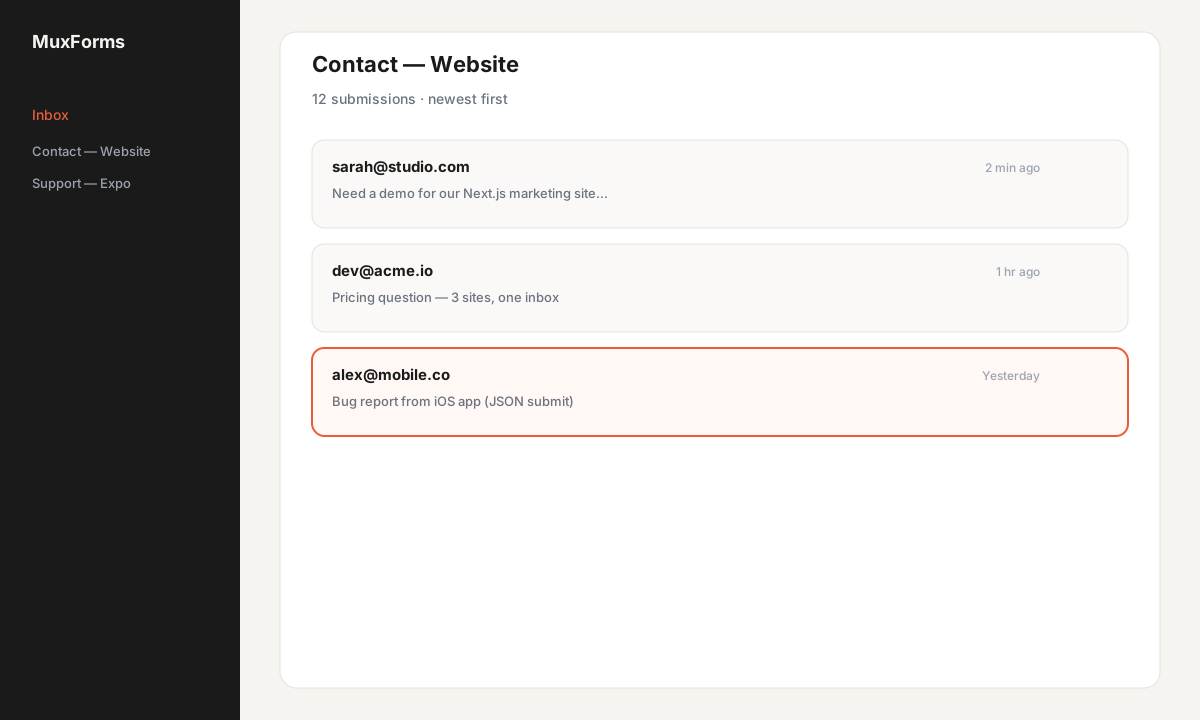
That single inbox is why teams with multiple Next.js properties use MuxForms instead of copying /api/contact into every repo. The features page lists embed, API, spam controls, and webhooks on the current plan.
Troubleshooting
CORS errors in the browser console
Symptoms: Access-Control-Allow-Origin errors on OPTIONS or POST to muxforms.com.
Fix:
- Add the exact origin (
https://www.example.com, notexample.comalone unless you redirect consistently). - Use
httpsin production if your site is served over TLS. - Prefer a Server Action or server proxy if you do not want to manage origins for custom client fetch.
The embed performs a preflight; allowed origins come from the form settings, not from Next.js config.
403 Forbidden
Common causes:
| Cause | What to do |
|---|---|
| Origin not allowlisted | Add the site URL on the form |
| Missing or wrong ingest secret | Regenerate secret; update server env |
| Invalid submit token (custom client) | Use embed, or GET schema for token, or server-side secret |
| Form paused (subscription) | Owner must renew; message explains in JSON body |
| Turnstile enabled but token missing | Complete Turnstile on the client or disable for testing |
Read the JSON error field in the response body; the API docs map statuses to fixes.
422 Unprocessable
Validation failed: unknown field name, required field missing, or text longer than the schema max (5,000 characters by default per text field). Compare your payload keys to the dashboard field names (not labels). Fix the form or the JSON so they match.
429 Too Many Requests
Rate limiting kicked in. Back off and retry; avoid tight loops in E2E tests against production.
413 Payload Too Large
JSON body exceeds 64 KB. Shorten textarea content or split attachments (MuxForms does not accept file fields on the standard schema today).
FAQ
Do I have to delete my existing /api/contact route?
No, but once MuxForms works you usually can. Fewer secrets and fewer deploy paths.
Does the embed work with React Server Components?
Yes, via a small client wrapper or a global Script tag as shown above.
Can I use the same form on staging and production?
Add both origins to the allowlist, or use separate forms per environment.
How does this compare to Formspree?
Formspree is a strong email forwarder with tiered submission caps. MuxForms targets one flat plan, embed + inbox + mobile JSON. See the Formspree comparison.
Where is the Next.js-specific doc?
Next.js integration and the docs index.
Next steps
- Add honeypot and Turnstile before you launch publicly.
- Point mobile apps at the same form id — Expo tutorial.
- Start a free trial and ship the contact page this afternoon instead of copying backend glue again.
Common questions
- Why do I see a CORS error in the browser?
- The form origin is not on the allowlist. Add https://www.your-domain.com exactly, or POST from a Server Action with the ingest secret instead.
- What does 403 mean on submit?
- Wrong or missing ingest secret, invalid submit token, disallowed origin, paused form, or failed Turnstile. Read the JSON error field in the response.
- What does 422 mean?
- Payload failed schema validation—field names must match the dashboard, required fields must be present, and text must be within length limits.
- Do I delete /api/contact?
- You can once MuxForms works; many teams keep a thin proxy only if the secret must stay server-side for client fetch.
- Where is the full tutorial?
- This page includes embed, Server Action, and troubleshooting sections with code samples.
- How does MuxForms compare to Formspree?
- See the Formspree comparison page for pricing, submission caps, and webhooks.
Put the form backend outside the repo.
Create a MuxForms account and stop copying contact routes.
Upgrade to Pro