
Expo and website forms in one inbox means the same MuxForms form id on embed.js and in fetch() from React Native. Support and sales search one stream when users write from iOS, Android, or the marketing site.
Article
Collect Expo and website form submissions in one inbox
Native apps should not need a second form vendor. POST JSON from Expo, embed on the marketing site, read both in MuxForms.
Unified inbox
| Source | Integration |
|---|---|
| Website | embed.js + allowlist |
| Expo app | POST JSON + ingest secret |
| Production | Prefer server proxy for secret |
| API | /docs/api |
Mobile teams often end up with two form systems: an embed or plugin on the marketing site and a WebView to Typeform or Google Forms inside the app. Support then asks “which inbox?” when a user says they submitted feedback yesterday.
MuxForms uses one form id everywhere: embed.js on the website, fetch from Expo or React Native with JSON, and one searchable dashboard. There is no native SDK — HTTP is the integration. This tutorial shows a complete Expo contact screen, the same form on the web, ingest secret handling, and troubleshooting for 403 and 422 errors you will see when field names drift.
Read React Native docs for a condensed reference and MuxForms vs Typeform if you are deciding between hosted survey UI and your own native fields.
Architecture in one paragraph
The marketing site loads https://www.muxforms.com/embed.js with data-form-id. The app POSTs to https://www.muxforms.com/api/v1/forms/{id}/submit with Content-Type: application/json and the per-form ingest secret in Authorization and X-MuxForms-Ingest-Secret. CORS does not apply to native fetch — only browser embeds need allowlisted origins. Both channels write to the same Postgres-backed inbox.
Prerequisites
- Expo SDK 50+ (or bare React Native with
fetch). - MuxForms form with fields you will map in code, e.g.
email,message, optionalplatform. - Ingest secret generated in the dashboard (never commit it to a public repo).
- Website allowlist configured if you also use the embed (embed doc).
Step 1 — Define one schema for web and mobile
In the dashboard, create fields with stable machine names:
| Label | Name | Type |
|---|---|---|
email | ||
| Message | message | textarea |
| Platform | platform | text (optional) |
The website embed renders these automatically. The app must send the same keys. If the app sends body but the schema expects message, you get 422.
Add your marketing origin (https://www.yourapp.com) to allowed origins for the embed. Mobile submits ignore CORS but still need the ingest secret.
Step 2 — Website embed (same form id)
On your landing page:
<div data-form-id="FORM_UUID"></div>
<script src="https://www.muxforms.com/embed.js" defer></script>
Or follow the Next.js tutorial if the site is not static HTML.
Step 2b — Shared types between web and mobile (optional)
If you use a monorepo, export a ContactPayload type from a shared package:
export type ContactPayload = {
  email: string;
  message: string;
  platform?: "ios" | "android" | "web";
  _hp?: string;
};
The marketing site’s Server Action and the Expo screen both import it so refactors do not silently break 422 validation. The schema in MuxForms remains the source of truth for which keys exist, but TypeScript catches typos before you ship.
Step 3 — Expo: environment variables
Use expo-constants or EAS secrets for production values:
# .env (do not commit real secrets)
EXPO_PUBLIC_MUXFORMS_FORM_ID=00000000-0000-0000-0000-000000000000
MUXFORMS_INGEST_SECRET=ingsec_xxxxxxxx
EXPO_PUBLIC_* is visible in the client bundle — do not put the ingest secret in a public env var. Pass the secret from a small backend, or use EAS Build with server-side proxy, or accept that production apps often use a minimal API route you control that forwards to MuxForms.
Recommended for production: a server endpoint (Next.js Route Handler, Cloudflare Worker, etc.) that holds the secret. The app calls your API; your API calls MuxForms. The pattern is identical to the Next.js proxy in the Next.js contact form guide.
For internal builds and MVPs, teams sometimes embed the secret in the binary — understand the tradeoff (any secret in the app can be extracted). Rotate the ingest secret if leaked.
Step 4 — Expo contact screen with fetch
import { useState } from "react";
import { View, Text, TextInput, Pressable, ActivityIndicator, Alert } from "react-native";

const FORM_ID = process.env.EXPO_PUBLIC_MUXFORMS_FORM_ID!;
// Production: call your proxy URL instead of muxforms.com directly if the secret stays server-side.
const SUBMIT_URL = `https://www.muxforms.com/api/v1/forms/${FORM_ID}/submit`;

async function submitFeedback(email: string, message: string) {
  const res = await fetch(SUBMIT_URL, {
    method: "POST",
    headers: {
      "Content-Type": "application/json",
      Authorization: `Bearer ${process.env.MUXFORMS_INGEST_SECRET}`,
      "X-MuxForms-Ingest-Secret": process.env.MUXFORMS_INGEST_SECRET!,
    },
    body: JSON.stringify({
      email,
      message,
      platform: "ios",
      _hp: "",
    }),
  });

  const data = await res.json().catch(() => ({}));
  if (!res.ok) {
    throw new Error(typeof data.error === "string" ? data.error : `HTTP ${res.status}`);
  }
  return data;
}

export function FeedbackScreen() {
  const [email, setEmail] = useState("");
  const [message, setMessage] = useState("");
  const [loading, setLoading] = useState(false);

  async function onSubmit() {
    setLoading(true);
    try {
      await submitFeedback(email.trim(), message.trim());
      Alert.alert("Thanks", "We received your feedback.");
      setMessage("");
    } catch (e) {
      Alert.alert("Could not send", e instanceof Error ? e.message : "Try again");
    } finally {
      setLoading(false);
    }
  }

  return (
    <View style={{ padding: 24, gap: 12 }}>
      <Text style={{ fontSize: 22, fontWeight: "600" }}>Send feedback</Text>
      <TextInput
        autoCapitalize="none"
        keyboardType="email-address"
        placeholder="you@company.com"
        value={email}
        onChangeText={setEmail}
        style={{ borderWidth: 1, borderColor: "#ccc", padding: 12, borderRadius: 8 }}
      />
      <TextInput
        multiline
        placeholder="What happened?"
        value={message}
        onChangeText={setMessage}
        style={{ borderWidth: 1, borderColor: "#ccc", padding: 12, minHeight: 120, borderRadius: 8 }}
      />
      <Pressable onPress={onSubmit} disabled={loading} style={{ backgroundColor: "#e85d3a", padding: 14, borderRadius: 8 }}>
        {loading ? <ActivityIndicator color="#fff" /> : <Text style={{ color: "#fff", textAlign: "center" }}>Submit</Text>}
      </Pressable>
    </View>
  );
}
Set platform to android on that OS if you want to filter in the inbox later.
Submit API reference: Form submit API.
Step 5 — Server Action alternative (Expo + shared Next.js backend)
If your product already has a Next.js API, prefer forwarding server-side:
// apps/web/app/api/feedback/route.ts
import { NextResponse } from "next/server";

export async function POST(req: Request) {
  const { email, message, platform } = await req.json();
  const res = await fetch(
    `https://www.muxforms.com/api/v1/forms/${process.env.MUXFORMS_FORM_ID}/submit`,
    {
      method: "POST",
      headers: {
        "Content-Type": "application/json",
        Authorization: `Bearer ${process.env.MUXFORMS_INGEST_SECRET}`,
        "X-MuxForms-Ingest-Secret": process.env.MUXFORMS_INGEST_SECRET!,
      },
      body: JSON.stringify({ email, message, platform, _hp: "" }),
    },
  );
  const body = await res.json().catch(() => ({}));
  return NextResponse.json(body, { status: res.status });
}
Expo then posts to https://api.yourapp.com/api/feedback with no MuxForms secret in the app binary.
Step 5b — EAS Build and secrets
With EAS, store MUXFORMS_INGEST_SECRET as a secret environment variable for build profiles that need direct MuxForms access. Prefer preview profile calling your staging proxy and production profile calling production API routes.
Document rotation: when you roll the ingest secret in the dashboard, update EAS secrets and redeploy. Old app binaries with a stale secret will see 403 until users upgrade.
Step 6 — Verify one inbox
Submit once from the website embed and once from the simulator. Open the MuxForms dashboard.
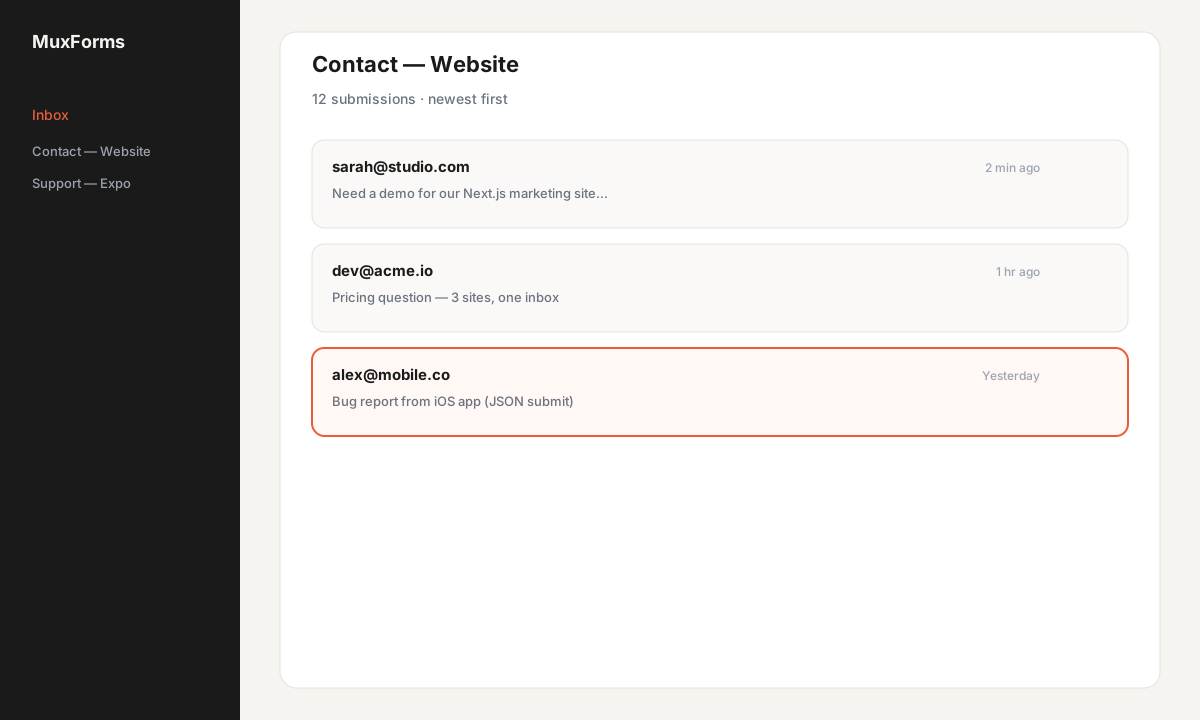
Search by email. Support no longer needs to ask which channel the customer used.
Optional: configure a webhook per form to push into Slack or a CRM — same stream for web and mobile.
Analytics and support workflows
When support searches the inbox by email, web and app rows appear together. Train the team to check platform (if you send it) instead of asking “did you use the website or the app?”.
For product analytics, you can increment your own event after a successful fetch, or consume MuxForms webhooks server-side to push into Segment or PostHog. The ingest endpoint itself stays a simple POST — no SDK initialization or session handshake.
Troubleshooting
403 Forbidden on mobile
Native apps do not send browser Origin, so CORS is rarely the issue. Check:
- Ingest secret missing or wrong header name (
X-MuxForms-Ingest-Secretand/orAuthorization: Bearer) - Secret rotated in dashboard but not in EAS secrets
- Form inactive or owner subscription paused (JSON error explains)
- Accidentally calling submit from a WebView without secret — use ingest secret or embed token flow
422 Unprocessable Entity
Validation failed. Dump the response body — it often lists fields.
- Email field required but empty string sent
- Wrong key (
feedbackvsmessage) - Text exceeds max length (5,000 chars default)
- Select field sent a value not in options
Align app payload with dashboard schema; run one test via curl using API doc examples.
CORS (Expo Web only)
If you run the same code on Expo Web, the browser enforces CORS like any site. Add http://localhost:8081 or your web preview origin to the form allowlist, or proxy through your API.
Network errors / SSL
Corporate proxies and bad sim network cause generic failures. Test on device with LTE; log res.status.
429 / 413
Aggressive retry loops hit rate limits. Very long JSON hits 64 KB cap — trim attachments (file uploads are not standard on MuxForms text schemas; use links).
FAQ
Is there an official React Native SDK?
No. fetch + JSON is the supported path. See React Native docs.
Can I use different forms for iOS and Android?
Yes, but you lose a unified stream unless you merge in reporting. One schema with platform is usually enough.
Why not WebView Typeform?
Hosted UI breaks brand, offline, and deep linking. Compare positioning in MuxForms vs Typeform.
Same form as WordPress marketing site?
Yes — WordPress without plugin.
Webhooks for automation?
Available per form in the dashboard; see features.
Next steps
- Lock down secrets with a server proxy before store release.
- Add Turnstile on the website embed if bots hit the public page; mobile uses secret auth.
- Create an account and retire the second form vendor your app never should have needed.
Common questions
- 403 from the mobile app
- Usually a missing or rotated ingest secret. Native clients do not use CORS; check Authorization and X-MuxForms-Ingest-Secret headers.
- 422 from the mobile app
- JSON keys must match schema names (email, message, etc.). Inspect the error body for which field failed.
- Should the ingest secret live in the app?
- For store builds, proxy through your API. Secrets in the binary can be extracted; rotate if leaked.
- Does Expo Web need CORS?
- Yes—browser builds need the preview or production origin on the form allowlist.
- Is there a native SDK?
- No—fetch with JSON is the integration. See /docs/react-native.
- Why not WebView Typeform?
- Native UI plus one backend keeps brand and search consistent; see /compare/typeform.
Put the form backend outside the repo.
Create a MuxForms account and stop copying contact routes.
Upgrade to Pro