
A WordPress contact form without a plugin uses a Custom HTML block with MuxForms embed.js. Submissions skip PHP mail and theme form plugins, land in the MuxForms inbox, and sit beside leads from your Next.js and mobile apps.
Article
A WordPress contact form without another plugin
Theme plugins rot. MuxForms is one script tag, your own schema, and an inbox that also collects your other sites and apps.
WordPress steps
| Step | Action |
|---|---|
| 1 | Create form + allow site origin |
| 2 | Custom HTML block or theme enqueue |
| 3 | Test public URL (not editor preview) |
| 4 | Inbox + optional notify email |
WordPress contact forms usually mean a plugin: Contact Form 7, WPForms, or another stack that stores entries in wp_posts, fights PHP mail(), and breaks when the client changes hosts. For agency and product sites, that is a lot of moving parts for a five-field lead form.
MuxForms treats WordPress like any other HTML host: a Custom HTML block, one script tag, and an allowlisted origin. Submissions skip PHP mail entirely and show up in the same inbox as your Next.js and Expo properties. This guide is long-form on purpose — you will get copy-paste snippets, hosting caveats, troubleshooting for 403 and CORS, and links to the official WordPress doc.
Comparing plugins versus a backend? Read MuxForms vs Formspree for submission limits and pricing tables.
Why skip another WordPress plugin
Plugins add database tables, update churn, and conflicting CSS. wp_mail() is unreliable on budget hosts. Multisite and staging URLs multiply the configuration work.
MuxForms keeps the schema and spam rules in one dashboard. WordPress only renders a div and loads embed.js. When you migrate from Kinsta to Cloudways, you update the allowlist origin — the form id stays the same.
Prerequisites
- WordPress 6.x with block editor (Gutenberg).
- Ability to add a Custom HTML block (some roles need
unfiltered_html). - A MuxForms account and one form with fields such as
name,email,message. - Your public site URL, e.g.
https://www.client.com(no trailing slash).
Step 1 — Create the form in MuxForms
Create a form in the dashboard. Copy the form UUID from Install.
Under Allowed origins, add:
https://www.client.com(production)http://client.localor your staging URL if you test there
Browser submissions from the embed require a matching Origin. If you forget this step, the browser shows a failed POST and the network tab returns 403.
Optional: set notification email, honeypot, and appearance tokens (colors, radius) so the embed matches the brand without fighting theme CSS.
Step 2 — Add the embed in WordPress
Edit the page (Contact, Get in touch, etc.). Add a Custom HTML block where the form should appear. Paste:
<div data-form-id="FORM_UUID"></div>
<script src="https://www.muxforms.com/embed.js" defer></script>
Replace FORM_UUID with your id.
Important: Some security plugins strip <script> tags from posts. If the form div renders but nothing happens:
- Allow
muxforms.comin your CSP or script allowlist, or - Enqueue the script from
functions.php(see below).
Enqueue from the theme (recommended for production)
Add to your child theme’s functions.php:
<?php
add_action('wp_enqueue_scripts', function () {
  if (!is_page('contact')) {
    return;
  }
  wp_enqueue_script(
    'muxforms-embed',
    'https://www.muxforms.com/embed.js',
    [],
    null,
    true
  );
});
On the Contact page, use only the div in Custom HTML:
<div data-form-id="FORM_UUID"></div>
Change 'contact' to your page slug. This pattern survives optimizers that dislike inline scripts in post content.
Full platform notes: WordPress documentation.
Step 2b — Block themes (Twenty Twenty-Four and similar)
Block themes use the site editor. The flow is the same: insert Custom HTML in a template or page. If your agency ships a theme.json design, place the form inside a constrained layout block so field width matches the rest of the typography scale.
Some block themes load global styles that set input { width: 100% } — that is fine; MuxForms inputs pick up embed styles first. If inputs look cramped, widen the parent group block rather than overriding embed CSS in the theme.
For full-site editing (FSE), duplicate the Contact template per client only when you must; otherwise reuse one pattern and swap FORM_UUID per environment in your deployment notes.
Step 3 — Style the surrounding page in the theme
MuxForms styles fields inside the embed from dashboard appearance settings. Your theme still controls page width, headings, and spacing around the block.
Typical pattern:
<div class="contact-wrap alignwide">
  <h1>Contact us</h1>
  <p>We respond within one business day.</p>
  <div data-form-id="FORM_UUID"></div>
</div>
.contact-wrap {
  max-width: 42rem;
  margin: 0 auto;
  padding: 2rem 1rem;
}
Avoid nesting the embed inside aggressive overflow: hidden containers that clip validation messages.
Step 4 — Test from the front end
- Open the public page (not the editor preview — previews can use a different origin).
- Submit a row with a test email.
- Open the MuxForms inbox for that form.
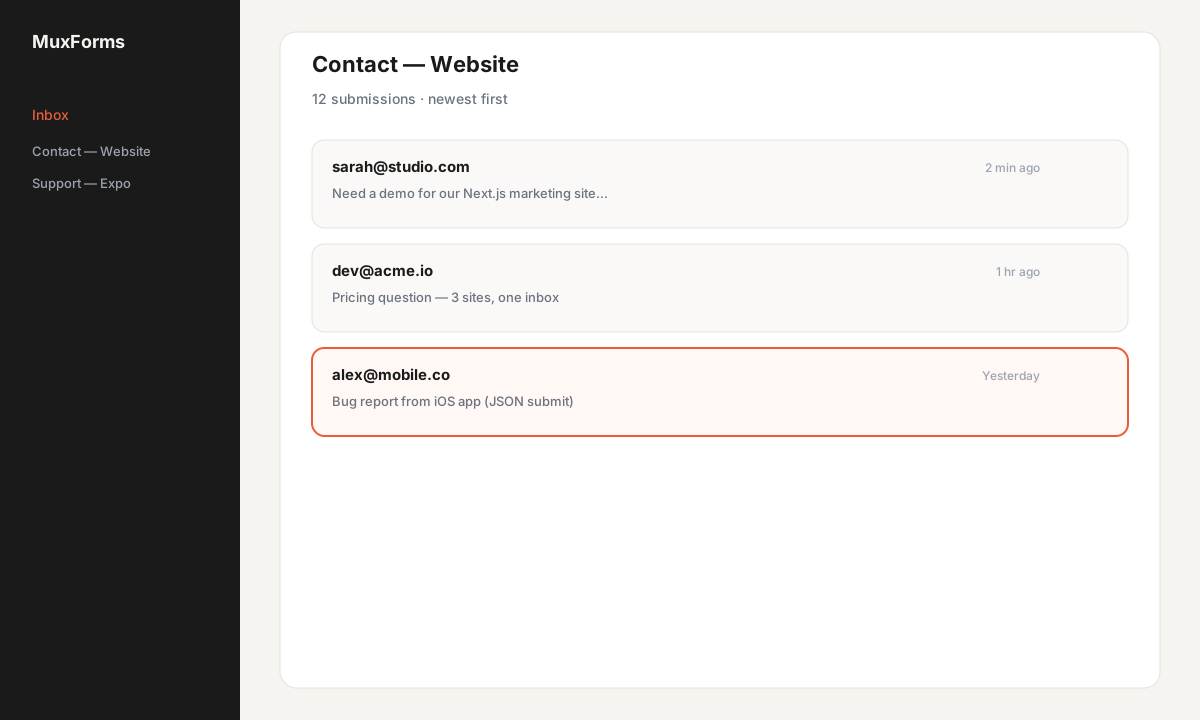
You should see the submission immediately. If email notify is on, check the inbox/spam folder for the MuxForms sending domain.
Step 4b — Local development with Local WP or Docker
Local installs often run at http://mysite.local or a random .local domain. Add that exact origin to MuxForms before you test. https://localhost is not the same as http://127.0.0.1:8080 — match what the browser shows in the address bar.
If you use a tunnel (ngrok, Cloudflare Tunnel) for client review, add the tunnel origin temporarily and remove it after sign-off so random URLs cannot post to your form.
Step 5 — Multisite and WooCommerce adjacent pages
Multisite: Each site URL is a different origin. Either:
- Add every subdomain/path origin to one form’s allowlist, or
- Create one MuxForms form per site for cleaner reporting.
WooCommerce: Checkout is unrelated; use MuxForms on static Contact / Support pages. Do not replace checkout unless you are building custom flows.
Caching (WP Rocket, LiteSpeed, etc.): Exclude embed.js from delay/defer bundles if the form never mounts. When in doubt, enqueue from functions.php with priority true in footer.
Server-side or headless WordPress
If the marketing site is WordPress but the app is Next.js, you still use one MuxForms form id across both — that is the point of a shared inbox. The Next.js tutorial covers Server Actions; WordPress stays on the embed.
For JSON submits from a custom PHP endpoint, use the ingest secret and POST to the submit API from PHP wp_remote_post. That is rare for classic themes but useful for headless frontends that still use WP as CMS.
$response = wp_remote_post(
  'https://www.muxforms.com/api/v1/forms/FORM_UUID/submit',
  [
    'headers' => [
      'Content-Type' => 'application/json',
      'Authorization' => 'Bearer ingsec_xxxxxxxx',
      'X-MuxForms-Ingest-Secret' => 'ingsec_xxxxxxxx',
    ],
    'body' => wp_json_encode([
      'name' => sanitize_text_field($_POST['name']),
      'email' => sanitize_email($_POST['email']),
      'message' => sanitize_textarea_field($_POST['message']),
      '_hp' => '',
    ]),
    'timeout' => 15,
  ]
);
Keep the secret in wp-config.php constants, not in the database.
Security and spam on public WordPress sites
WordPress contact pages are bot magnets. In MuxForms, enable the honeypot field and keep it hidden in the embed (default). Turn on rate limits before you run paid traffic. Optional Cloudflare Turnstile on the form adds a challenge without another WordPress plugin.
Because submissions never touch wp-admin, a compromised form plugin is one less entry point. Still keep WordPress core and themes updated; the embed only loads a script from muxforms.com.
Troubleshooting
CORS / “Origin is not authorized”
WordPress runs at https://www.client.com. The allowlist must include that exact origin. Common mistakes:
- Listing
https://client.comwhile the site redirects towww - Forgetting
https:// - Testing from
http://on production host
Fix in the MuxForms form settings, save, hard-refresh the page.
403 Forbidden (other causes)
| Symptom | Fix |
|---|---|
| Script blocked | Enqueue embed.js; check CSP |
| Form paused | Account owner renews subscription |
| Turnstile on | Complete challenge or disable while testing |
| Ad blocker | Test in clean profile |
422 Validation errors
Field names in the dashboard must match what the embed posts. Renaming a field in MuxForms without republishing cache can confuse old pages — clear page cache after schema changes.
Form markup stripped
Role cannot use Custom HTML scripts — use theme enqueue or a mu-plugin. Some builders (Elementor HTML widget) allow scripts; verify their docs.
Emails not arriving
MuxForms notify email is separate from WordPress. Confirm the notify address in the dashboard and verify the domain if required. WordPress wp_mail is not in the path for embed submits.
429 / 413
Too many rapid tests trigger rate limits (429). Huge paste in message hits 413 (64 KB JSON cap). Shorter test messages.
FAQ
Will this conflict with Contact Form 7?
No, but you do not need CF7 if MuxForms handles the page. Deactivate unused form plugins to reduce attack surface.
Is data stored in WordPress?
No — submissions live in MuxForms (Postgres). WordPress only hosts the embed snippet.
GDPR / privacy?
You are the controller for end-user data you collect; link your privacy policy near the form. See privacy policy for how MuxForms processes data.
Can I compare to Google Forms?
For client sites that should not use a google.com URL, see MuxForms vs Google Forms.
Where is the short doc version?
WordPress docs.
Next steps
Bookmark the compare hub when clients ask how this differs from Formspree or Netlify Forms — the tables include verified pricing rows you can forward in proposals.
- Mirror the same form on a Next.js landing page for a sibling product.
- Add spam controls before running ads to the contact page.
- Sign up and replace the next client’s CF7 install with one embed block.
Common questions
- 403 when submitting from WordPress
- Add the live site origin (https + www if you use www). Preview URLs and staging hosts need their own allowlist entries.
- Script tag stripped or form empty
- Enqueue embed.js from functions.php; check security plugins and CSP allowlists for muxforms.com.
- 422 validation errors
- Field names in MuxForms must match what the embed sends. Clear page cache after schema changes.
- Will Contact Form 7 conflict?
- No, but you can deactivate unused form plugins if MuxForms handles the page.
- Multisite?
- Each site URL is an origin—allow each one or use separate forms per site.
- Long-form guide vs docs?
- This article covers hosting edge cases; /docs/wordpress is the quick reference.
Put the form backend outside the repo.
Create a MuxForms account and stop copying contact routes.
Upgrade to Pro